
Announcement

Collapse
No announcement yet.

FMS setup

Collapse

Zenm Tech Pte Ltd

Collapse

Visit Zenmtech at rc.zenmtech.com

X
 
  • Filter
  • Time
  • Show
Clear All
new posts

    FMS setup

    Greetings,
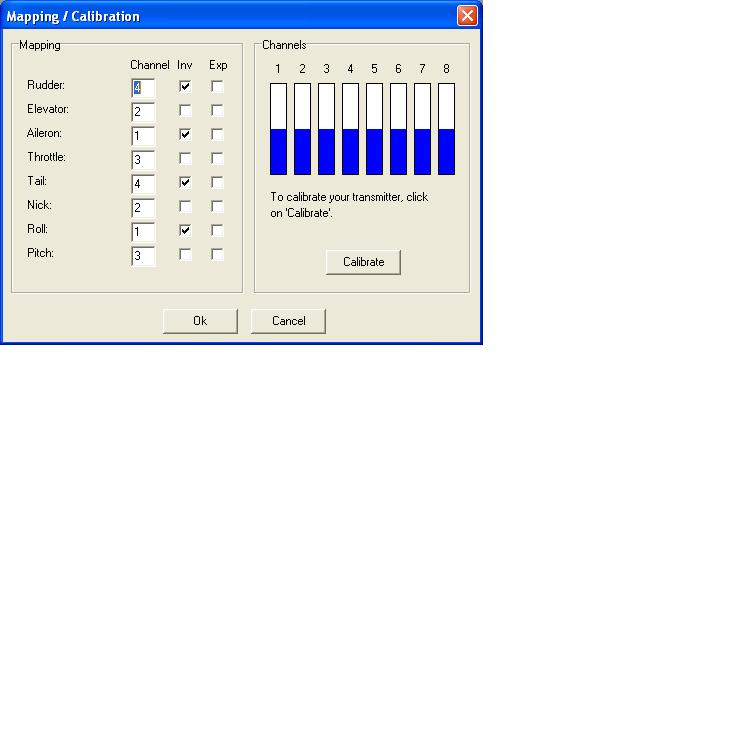
    I m really new to this r/c helicopter, got myself a hb king 2. Now using the FMS simulator to learn. Anyway, jus to check the calibration of the FMS. I set it as Tail-1, Nick-2, Roll-3, Pitch-4. I m right?
    When i move left stick up/down, nick-2 moves?
    When i move left stick left/right, roll-3 and pitch-4 moves?
    When I move right stick up/down, roll-3 and pitch-4 moves also?
    When I move right stick left/right, tail-1 moves?
    I feel someting is wrong? m i right? I cant get my copter to fly without tilting to the left immediately and crash, wats wrong? thks for all advise in advance
    Jerry
    Owner of
    HPI Savage 4.6 (sold)
    Dragon Volvo Electric boat (Nimbus) Dead
    Mustafa Tugboat
    HB king2(for sale)
    Mini-z
    Caster EX-1
    Tamiya DF03
    Tamiya TT01
    HSP Crawler(soon)

    #2
    what mode are you on ?
    Helis
    Logo 500 3D

    Once upon a time , there were frequency pins , flybars and nitros...

    Comment


      #3
      sorry, mode 1 man.
      Owner of
      HPI Savage 4.6 (sold)
      Dragon Volvo Electric boat (Nimbus) Dead
      Mustafa Tugboat
      HB king2(for sale)
      Mini-z
      Caster EX-1
      Tamiya DF03
      Tamiya TT01
      HSP Crawler(soon)

      Comment


        #4
        This may sound simple but I guess lots of newbie might not know which stick control which part of your aircraft. Below is a picture I grab from John which I think is really useful. http://www.daddyhobby.com/forum/images/imported/2007/01/94.jpg Cheers Mike

        i guess nick is tail
        Helis
        Logo 500 3D

        Once upon a time , there were frequency pins , flybars and nitros...

        Comment


          #5
          Sorry, but is the setup right? thks
          Owner of
          HPI Savage 4.6 (sold)
          Dragon Volvo Electric boat (Nimbus) Dead
          Mustafa Tugboat
          HB king2(for sale)
          Mini-z
          Caster EX-1
          Tamiya DF03
          Tamiya TT01
          HSP Crawler(soon)

          Comment


            #6
            try this: tail 4, nick 2, roll 1 n pitch 3, select all inv

            Comment


              #7
              nope ... right stick move up should be throttle
              right stick move left/right is roll
              left stick move up is pitch
              left stick move side to side is tail
              Helis
              Logo 500 3D

              Once upon a time , there were frequency pins , flybars and nitros...

              Comment


                #8
                plus, rudder 4, elevator 2, alieron 1 n thottle 3. all these from the manual

                Comment


                  #9
                  I think in FMS, the pitch is the throttle. And nick is the elevator.

                  So for Mode 1 settings:

                  Right stick up/down: Pitch
                  Right stick left/right: Roll
                  Left stick up/down: Nick
                  Left stick left/right: Tail

                  Comment


                    #10
                    darn, still not right! anyone using it,FMS? can advise wat you use? thks
                    Owner of
                    HPI Savage 4.6 (sold)
                    Dragon Volvo Electric boat (Nimbus) Dead
                    Mustafa Tugboat
                    HB king2(for sale)
                    Mini-z
                    Caster EX-1
                    Tamiya DF03
                    Tamiya TT01
                    HSP Crawler(soon)

                    Comment


                      #11
                      Not sure this will help , see attached file

                      Comment


                        #12
                        Originally posted by jerrylsp
                        darn, still not right! anyone using it,FMS? can advise wat you use? thks
                        I use FMS too. I have the same problem as you before. Maybe you wanna follow these steps which i did to setup FMS.

                        1) During calibration, take note of the corresponding channel# to the various sticks movement, one at a time. (For example, if I move throttle up and down, I should see one of the channels moves only. If channel 2 is moving, then throttle is tagged to channel 2)

                        2) Assigning the respective channels to various control. (For example, if channel 2 is linked to throttle stick, then assign '2' to pitch. During simulation, if throttle movement is opposite, check the box for 'Inv', which means inverse this channel)

                        3) If you wanna fly plane also, then you need to note the similar terms.
                        PLANE VS HELI
                        Rudder = Tail
                        Elevator = Nick
                        Aileron = Roll
                        Throttle = Pitch

                        Hope this helps.

                        Comment


                          #13
                          what sim prog u running?

                          FMS?

                          my controller abit haywire also, i can use it in fms but not in other sims, the controls become haywire and cannot detect.
                          HoneyBee King2
                          Stock Version

                          Installed
                          KA400H
                          XC2512BA 25A
                          Dualsky 1800 mAh 11.1v [xp18003SL]
                          FM35.010


                          Please pardon my newbie knowledge..

                          Comment

                          Working...
                          X